Showing posts with label monotouch. Show all posts

Thursday, August 2, 2012

Disable Itunes sync when iPhone is connected on Mac

When developing iPhone applications with monotouch it becomes very annoying that everytime you connect your iPhone to your mac it opens iTunes and starts to sync, followed by opening iPhoto.

You can disable both of these from opening:

Disabling iTunes from opening / syncing when iPhone is connected: 
Simple option in iTunes as shown:

Uncheck "Open iTunes when this iPhone is connected" and click apply.

Disabling iPhoto from opening when iPhone is connected: 
Open iPhoto. Goto Preferences:


And change "Connecting camera opens" to "No application" as shown:

Enjoy!


Monday, July 16, 2012

Getting the bleeding edge of MonoTouch / MonoForAndroid

If you want to know which version of MonoTouch you have installed you can find that in MonoDevelop using About MonoDevelop:

And click on Version information: 
You can see that my Monotouch version is 5.2.12 which as of this writing is the latest stable version. But in case there is a feature you badly want in the beta / alpha version you can switch over to those quite easily. 

Going Bleeding Edge
Just start MonoDevelop and go to Check for Updates as shown:


Next, now change your Update channel: 
And you will be able to see the Beta / Alpha version available. If you like what you see. Just click on Switch Channel as shown: 


It will start downloading and running the updates. Enjoy!

Sunday, July 15, 2012

Useful bookmarks for MonoTouch

Just in case its useful to have these links handy :

A list of bugs that have been already raised:
https://bugzilla.xamarin.com/

A list of bugs that were fixed in each release:
http://docs.xamarin.com/ios/releases

Friday, July 13, 2012

Setting up Git with MonoDevelop on Mac OS X

MonoDevelop on Mac ships with Git integration built in.

As an aside: My preferred source code provider is https://bitbucket.org/ because they provide unlimited free private repositories. I obviously use the same account for my open source projects as well. So this is the provider I tested.


First of all create a new git repository on BitBucket. Note down the git url as highlighted below:

Now open up MonoDevelop and select Version Control -> Checkout as shown:


Next select Registered Repositories and select Add and then in type Select Git as shown:

Next Copy paste that git url in the url field as shown, This will automatic fill most of the fields for you (cool) :

Just type in the Name (already shown in the previous image MondrianEvolved) and click Ok.

Next specify the newly added repository and select the target directory as a new directory you want created for this repository (make sure you end on /):

Click Ok, And when prompted type in the password as shown:
Your project will download. You are ready to rock and roll :

Additionally: 
Most git operations, you can now do from the context menu as shown:

And overall operations from the Menu :

commit messages:

And push changes:

Also if you are doing Git/Hg on Mac OS X I highly recommend you check out SourceTree : http://www.sourcetreeapp.com/
It picks up where MonoDevelop leaves off.

Enjoy!

Tuesday, June 26, 2012

Monotouch Gotcha : Dispose all outlets

If you have used winforms than you should be familiar with this pattern. Whenever you are done with a window be sure to call Dispose of any other windows that you have a reference to. The reason is that the windows are natively linked to OS windows and in your Dispose you are supposed to release any references to native resources.

In monotouch, even outlets are native objects. So be careful with them. In fact the default monotouch templates point you in the right direction as shown : 


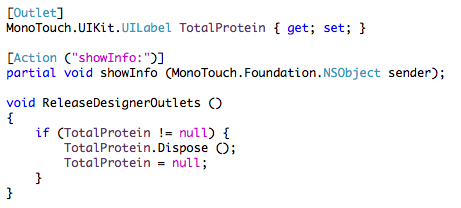
The ReleaseDesignerOutlets automatically adds the code to release any outlets that are created using Interface Builder inside of Xcode:


Of course non-native (managed) resources are not your responsibility : http://stackoverflow.com/a/6620835/390330 

Friday, June 15, 2012

Monotouch means business

What is the worlds largest medical technology company? Medtronic (Thats what google says. 
And thats what they say)

Do they have iPad applications used in hundreds of hospitals / medical centers? Why yes ... of course : http://www.apple.com/ipad/business/profiles/medtronic/

They used objective-c for this right? Wrong. http://www.infoq.com/news/2011/04/Mono-iPad

Details : http://vagabondrev.org/2011/04/20/monocross-the-technology/
And here is a nice presentation for people that like videos : http://www.infoq.com/presentations/The-Rise-of-Mono-in-the-Enterprise

Something to think about the next time someone says "Well you can use C# for iPads as well".
Of course there is nothing stopping someone coming up with saying "Well you can use Java for iPads as well" or is there

Tuesday, June 5, 2012

MonoTouch / Mono for Android (MonoDroid) links


My increasing list of links for learning and using monotouch / mono for android:

Libraries
Video Tutorials
From xamarin. New videos every week! http://www.youtube.com/xamarinhq