This is my implementation with a lot of comments for insertion sort implementation in python. Hopefully the comments can help people understand insertion sort better (like the reason for starting at index 1). You can also view it here https://gist.github.com/3216903 :
Showing posts with label python. Show all posts
Showing posts with label python. Show all posts
Tuesday, July 31, 2012


Saturday, August 27, 2011
Django + Google App Engine == love
The support for Django in Google app engine is almost completely perfect. The only thing missing is the fact that you cannot query on joins. A build of Django that is up to date and takes this fact into account is available called "django-norel"
To get started on converting Google App Engine Projects to Django you can view this post : http://code.google.com/appengine/articles/django-nonrel.html
And to get started on converting Pure Django projects on Google App Engine you should read this :
http://www.allbuttonspressed.com/projects/djangoappengine
To get started on converting Google App Engine Projects to Django you can view this post : http://code.google.com/appengine/articles/django-nonrel.html
And to get started on converting Pure Django projects on Google App Engine you should read this :
http://www.allbuttonspressed.com/projects/djangoappengine
Sunday, August 21, 2011
Using pycharm as an HTML/CSS editor
Pycharm is truly a complete IDE.
While going through CSS the missing manual I am using pycharm as my primary editor and it a joy to work with.
Here is one feature I especially like ... I start with a file like this (notice the terrible wordwrap):

I press Ctrl+Alt+L or the menu Code -- Reformat Code
And pycharm will even fix the wordwrap for me (along with the obvious fixing the tabs in the head section):

Also ... pycharm has a dictionary checker () as well ... which isn't present even in VS2010 without an extension ... and I haven't found a VS extension that is as painless + on the fly.
Look at the colors in the sidebar
Another neat feature is that pycharm shows the color in CSS in the editors sidebar as shown:

Write CSS Faster:
Pycharm comes with snippets for all the css properties you could even want. E.g. to quickly add margin-bottom simply type mb as shown:
 Press tab and you get a region where you can type the value you want:
 Press Enter and it takes you to the end of that particular declaration so that you can start work on the next one i.e. note the position of the cursor in this picture:

Final words:
With pycharm I see python / django / GoogleAppEngine penetration really skyrocketing.
Enjoy!
While going through CSS the missing manual I am using pycharm as my primary editor and it a joy to work with.
Here is one feature I especially like ... I start with a file like this (notice the terrible wordwrap):

I press Ctrl+Alt+L or the menu Code -- Reformat Code
And pycharm will even fix the wordwrap for me (along with the obvious fixing the tabs in the head section):

Also ... pycharm has a dictionary checker () as well ... which isn't present even in VS2010 without an extension ... and I haven't found a VS extension that is as painless + on the fly.
Look at the colors in the sidebar
Another neat feature is that pycharm shows the color in CSS in the editors sidebar as shown:

Write CSS Faster:
Pycharm comes with snippets for all the css properties you could even want. E.g. to quickly add margin-bottom simply type mb as shown:

Final words:
With pycharm I see python / django / GoogleAppEngine penetration really skyrocketing.
Enjoy!
Friday, August 19, 2011
All about django hosting
Django is by far the most popular web framework for Python. This was validated further when google app engine provided support for django templates.
So now that the python web framework battle is settled the question of hosting your application is the only one that remains (and will remain ... its a good thing).
Community Page
First off ... the official community page is : http://djangofriendly.com/hosts/
A more personalized page
This is a good link just as it is : http://djangohosting.com/
In Short (people's vote)
The most recommended shared host is webfaction.
My Personal recomendation
Feature wise https://www.alwaysdata.com/ is the best. You even get SSH access! Even make remote user accounts with differentiated permissions.
You can try them for free (not time limited) with a 10MB storage account.
Enjoy!
So now that the python web framework battle is settled the question of hosting your application is the only one that remains (and will remain ... its a good thing).
Community Page
First off ... the official community page is : http://djangofriendly.com/hosts/
A more personalized page
This is a good link just as it is : http://djangohosting.com/
In Short (people's vote)
The most recommended shared host is webfaction.
My Personal recomendation
Feature wise https://www.alwaysdata.com/ is the best. You even get SSH access! Even make remote user accounts with differentiated permissions.
You can try them for free (not time limited) with a 10MB storage account.
Enjoy!
Thursday, August 18, 2011
Using the django version that comes with google app engine as your default
I have google app engine installed in my C: drive and the path to django looks like this :
 I modified my PYTHONPATH adding "C:\Program Files\Google\google_appengine\lib\django_1_2;" at the end as shown (the ; should not be important but some ide's need it to scan properly):

To run the django tools from the command line (not google app engine specific ... valid for all django installations):
I then added the django's bin folder "C:\Program Files\Google\google_appengine\lib\django_1_2\django\bin" to my system PATH as shown:

Next you need to fix the file association using the following registry script (save as .reg and merge)
Windows Registry Editor Version 5.00
[HKEY_CLASSES_ROOT\py_auto_file\shell\open\command] @="\"C:\\PYTHON\\App\\python.exe\" \"%1\" %*"
This basically adds this key:

Now you can test it from the command pro as follows :
"django-admin.py --version"

Enjoy!


To run the django tools from the command line (not google app engine specific ... valid for all django installations):
I then added the django's bin folder "C:\Program Files\Google\google_appengine\lib\django_1_2\django\bin" to my system PATH as shown:

Next you need to fix the file association using the following registry script (save as .reg and merge)
Windows Registry Editor Version 5.00
[HKEY_CLASSES_ROOT\py_auto_file\shell\open\command] @="\"C:\\PYTHON\\App\\python.exe\" \"%1\" %*"
This basically adds this key:

Now you can test it from the command pro as follows :
"django-admin.py --version"

Enjoy!
Saturday, July 30, 2011
Programming Interview Tip : What is the probability that when you open a random page in a phone book the contact you are looking for is in there?
Lets say the phone book pages are numbered from 1 - 1000. And assume that the contact is definitely there in the book.
So when you randomly flip open a book there are 1 of 500 choices that it is one one of the two pages that appear before you.
So the probability is 1/500.
Next Question : How many attempts will it take for me to be certain that the contact is there?
Well you can NEVER be 100% sure .... for obvious reasons :)
Next Question : So how many attempts will it take for me to be 50% sure that the contact is found in one of the two pages that show up?
The 50% is called percent confidence in statistics lingo.
This is best solved by the difference from 1 for the probability of the contact NOT being on the page.
For each attempt to fail we need to multiply 499/500 . So for n attempts to fail it is (499/500)^n. So the probability of it being successful in n attempts is {1-(499/500)^n}
So you need to solve the equation :
{1-(499/500)^n} = .5
which is obviously :
(499/500)^n = .5
And taking log to the base 499/500 on both sides (using python) :
n = 347 attempts
double verify :
So when you randomly flip open a book there are 1 of 500 choices that it is one one of the two pages that appear before you.
So the probability is 1/500.
Next Question : How many attempts will it take for me to be certain that the contact is there?
Well you can NEVER be 100% sure .... for obvious reasons :)
Next Question : So how many attempts will it take for me to be 50% sure that the contact is found in one of the two pages that show up?
The 50% is called percent confidence in statistics lingo.
This is best solved by the difference from 1 for the probability of the contact NOT being on the page.
For each attempt to fail we need to multiply 499/500 . So for n attempts to fail it is (499/500)^n. So the probability of it being successful in n attempts is {1-(499/500)^n}
So you need to solve the equation :
{1-(499/500)^n} = .5
which is obviously :
(499/500)^n = .5
And taking log to the base 499/500 on both sides (using python) :
>>> math.log(.5,499/500.0)
346.22690104949118
n = 347 attempts
double verify :
>>> math.pow(499/500.0,346.22690104949118)
0.5
Monday, July 18, 2011
Programming interview tip : Finding anagrams
Find all the words in a list of words (listA) which are anagrams of a single input word (wordA).
Bad solution (the trap):
look at all the possible permutations of wordA and find them in listA.
This is a terrible solution and has a complexity of countOfCharactersInWord(wordA)!
where ! is the factorial symbol :)
Good solution:
take all the characters in wordA and sort them. Then compare it with the each item in listA first sorting the characters of that item as well :)
In python :
This yields for my friend "omair" the following interesting (i made them bold) anagrams:
I used the SCOWL wordlist for this. You can get the complete working code (including the wordlist) from here:
https://bitbucket.org/basarat/pyanagram/overview
Enjoy!
Bad solution (the trap):
look at all the possible permutations of wordA and find them in listA.
This is a terrible solution and has a complexity of countOfCharactersInWord(wordA)!
where ! is the factorial symbol :)
Good solution:
take all the characters in wordA and sort them. Then compare it with the each item in listA first sorting the characters of that item as well :)
In python :
This yields for my friend "omair" the following interesting (i made them bold) anagrams:
mario
arimo
moria
omari
maori
moira
I used the SCOWL wordlist for this. You can get the complete working code (including the wordlist) from here:
https://bitbucket.org/basarat/pyanagram/overview
Enjoy!
Saturday, July 16, 2011
Programming interview tip : Combinations from a list
This question will be discussed in python, since it is uber simple to write functioning yet short programs in :)
Say you have a list of n items e.g.
seq = [1,2,3]
Find products of all items with each other
This is the simplest question.
Solution:
This gives the following output:
Find unique products of the items with each other
This means that you need that you can only have 1*2 or 2*1 etc
Solution: Really simple to do. Each time in the inner loop start at i rather than 0 as shown:
This gives the following output:
Find unique products and do not multiply a list item with itself
This means that you cannot have 1*1 , 2*2 etc.
Solution: In the inner loop you need to avoid starting at i and rather start at i+1 (since this is the i*i case we need to avoid).
Also if this is all you do at i = n the inner loop will not run so its better to stop the outer loop at n-1
In both cases the output will be:
Say you have a list of n items e.g.
seq = [1,2,3]
Find products of all items with each other
This is the simplest question.
Solution:
This gives the following output:
1 * 1 = 1
1 * 2 = 2
1 * 3 = 3
2 * 1 = 2
2 * 2 = 4
2 * 3 = 6
3 * 1 = 3
3 * 2 = 6
3 * 3 = 9
Find unique products of the items with each other
This means that you need that you can only have 1*2 or 2*1 etc
Solution: Really simple to do. Each time in the inner loop start at i rather than 0 as shown:
This gives the following output:
1 * 1 = 1
1 * 2 = 2
1 * 3 = 3
2 * 2 = 4
2 * 3 = 6
3 * 3 = 9
Basically notice at each increment of i we do not allow j to go back.
Find unique products and do not multiply a list item with itself
This means that you cannot have 1*1 , 2*2 etc.
Solution: In the inner loop you need to avoid starting at i and rather start at i+1 (since this is the i*i case we need to avoid).
Also if this is all you do at i = n the inner loop will not run so its better to stop the outer loop at n-1
In both cases the output will be:
1 * 2 = 2
1 * 3 = 3
2 * 3 = 6
Enjoy!
Sunday, July 3, 2011
Code first development with .NET hits primetime
I remember code first development since the days of django :
https://docs.djangoproject.com/en/dev/intro/tutorial01/
This was on of the best database experience I have had.
Now the same thing is possible out of the box with .NET using code first devleopment. The launch blog post is here :
http://weblogs.asp.net/scottgu/archive/2010/07/16/code-first-development-with-entity-framework-4.aspx
I just came across a really nice Associations tutorial here : http://weblogs.asp.net/manavi/archive/2011/05/17/associations-in-ef-4-1-code-first-part-6-many-valued-associations.aspx
Enjoy!
https://docs.djangoproject.com/en/dev/intro/tutorial01/
This was on of the best database experience I have had.
Now the same thing is possible out of the box with .NET using code first devleopment. The launch blog post is here :
http://weblogs.asp.net/scottgu/archive/2010/07/16/code-first-development-with-entity-framework-4.aspx
I just came across a really nice Associations tutorial here : http://weblogs.asp.net/manavi/archive/2011/05/17/associations-in-ef-4-1-code-first-part-6-many-valued-associations.aspx
Enjoy!
Monday, June 20, 2011
Some interesting facts about Google App Engine
Google App Engine is awesome. So beyond this simple fact here are some other interesting ones:
Account Registration
For the first time you click on "Create Application" (https://appengine.google.com/) You need to sign up with a phone number. Facts:
When you create a new application not all options will be changeable. At the time of this writing you can see options which are available for change and which are readonly (Authentication Options used to be readonly as well apparently but as you can see I can change them right now):

And since you cannot reuse the application ID it is important to set it right the first time.
Download Application Files
There is no way to download files from AppEngine (you can only upload....this actually makes me feel secure). So you should use your own version control system (I suggest http://www.bitbucket.org)
AppEngine is designed for fast response times
If an app routinely takes a long time to respond to requests, AppEngine will punish it to make room for faster requests.
Enjoy!
Account Registration
For the first time you click on "Create Application" (https://appengine.google.com/) You need to sign up with a phone number. Facts:
- If you try this without a supported carrier (mentioned here) You will start to get the error message "You have sent too many SMS verification messages" In this case goto http://appengine.google.com/waitlist/sms_issues and mention why you are getting this error (your phone number). Your case will be evaluated and if found eligible your appspot account will be activated.
- You phone number is linked to your google account. You cannot use the same phone number to register for appspot using another account.
Application Registration
When you create a new application not all options will be changeable. At the time of this writing you can see options which are available for change and which are readonly (Authentication Options used to be readonly as well apparently but as you can see I can change them right now):

And since you cannot reuse the application ID it is important to set it right the first time.
Download Application Files
There is no way to download files from AppEngine (you can only upload....this actually makes me feel secure). So you should use your own version control system (I suggest http://www.bitbucket.org)
AppEngine is designed for fast response times
If an app routinely takes a long time to respond to requests, AppEngine will punish it to make room for faster requests.
Enjoy!
Saturday, June 18, 2011
Pycharm is an amazing python ide
There are really a lot of little big details in PyCharm that make it worth and and much much more.
Here are some I noticed immediately:
Project Management
A working project management system. The eclipse project management (workspace per project!) is deeply broken. PyCharm to the rescue.
A google app engine project in pycharm :
 Basically its a folder with a .idea folder inside of it as shown:
 Open a project :


Here are some I noticed immediately:
Project Management
A working project management system. The eclipse project management (workspace per project!) is deeply broken. PyCharm to the rescue.
A google app engine project in pycharm :


Close a project:

Multi Monitor Support
Its not big for some people. Its big for me. Drag the tab header out of the application to create a new window. Drag it back to place it back into the application.

Google App Engine deep integration
I've already shown how to debug Google App Engine with PyCharm: http://www.basarat.com/2011/06/google-app-engine-python-pycharm-love.html
But I would like to mention additional google app engine integration in the tools menu :

Test driven development (TDD)
Ability to run tests from the IDE. Additionally you can debug while a test runs :)
View variable value while debugging
Adding a variable to watch takes typing. Mousing over is faster :

Access to the debug console while an application runs
This is super cool. If you find code is not working the way it is not only can you find out why but you can write the correct code and see if it works on the spot using the debug console:

You can see it works with google app engine as well :)
About the Code Editor
Yes there is intellisense and all the other bells and whistles that you expect from a basic editor. But PyCharm does more than the other python ides I have seen e.g. :
Zoom code with Ctrl+ Scroll wheel
Zoomed in:

Zoomed out. You can see more and get an overview of where the function is going thanks to python keeping indentation important :) :

Ctrl Click to navigate to function
Nothing can help you understand code better than go to definition. Comments lie. Code does not :)
In PyCharm when you hold the ctrl key and mouse over a function / class it turns into a hyperlink as shown:

Notice that this is a class inside of Google App Engine :) Click it while holding the ctrl key and the class definition is opened for you :

Can't I get the same thing in Visual Studio ... cause when you are looking at code you probably already have the mouse in your hand and F12 is just so far away :)
The override icon
A really nice touch. Especially since python does not have the override keyword. Notice the icon on the line def get(self):

Reformat code
Don't you just have poorly formated code e.g. = hugging the variable , line continuations starting too late or too early. PyCharm fixes these for you :

Also when looking at another persons code you might want to use the optimize imports :)
Goto Class
Check it out :

This opens a search panel that can even search by Pascal Case (notice I typed rh) :)

Truly. Python IDEs have been charmed :)
Enjoy!
Friday, June 17, 2011
Google App Engine Python + PyCharm = love
I think I have just found the best debugging / development environment ( IDE ) for google app engine. PyCharm.
Not surprising. Its from JetBrains :) They guys that make ReSharper (a lovely VisualStudio C# plugin) and IntelliJ IDEA (the best performing java development IDE I used a long time ago ... one that people love and use despite free eclipse / netbeans being available).
I like my IDEs snappy and PyCharm is like a Snappy Snake :)
And it feels like its made with google app engine (AND / OR) django in mind.
NOTE: PyCharm version 1.5, Google App Engine version : 1.5.0
As soon as you start PyCharm you see the following screen :
 Click on Create a New Project and you get the option to create a GoogleAppEngine application right off the bat as shown:
 Setup the project name (your choice) / location (your choice) and type (as Google App Engine project) and click Ok and you are presented with the following screen:

(NOTE: I was working on x64 machine. That is probably why the SDK is not filled ... nonetheless)
Filled in the SDK as : "C:\Program Files (x86)\Google\google_appengine" (note working on x64 machine otherwise it is : "C:\Program Files\Google\google_appengine"
Setup the python interpreter (I prefer to use portable python that is why it does show up by default) by clicking on the browse icon and then selecting Add.
And Finally click Ok.
I now have a debug-able Google App Engine project available. In the screen shot below I setup a break point, just clicked the debug icon, waited for app engine to start and browsed to http://localhost:8080

Just installing PyCharm and creating a new project and I can already debug! This is much more like the visual studio experience that I love and adore and was afraid I might never find with GAE.
Also check out pycharm figured out the google app engine import locations without me telling it anything other than the google app engine install path:

If it wasn't for this software I really was about to give up on GAE because without a powerful trouble shooting / development environment like this maintaining applications would have been a real hassel.
Yes I am madly in love with Python and now PyCharm.
Enjoy!
Not surprising. Its from JetBrains :) They guys that make ReSharper (a lovely VisualStudio C# plugin) and IntelliJ IDEA (the best performing java development IDE I used a long time ago ... one that people love and use despite free eclipse / netbeans being available).
I like my IDEs snappy and PyCharm is like a Snappy Snake :)
And it feels like its made with google app engine (AND / OR) django in mind.
NOTE: PyCharm version 1.5, Google App Engine version : 1.5.0
As soon as you start PyCharm you see the following screen :


(NOTE: I was working on x64 machine. That is probably why the SDK is not filled ... nonetheless)
Filled in the SDK as : "C:\Program Files (x86)\Google\google_appengine" (note working on x64 machine otherwise it is : "C:\Program Files\Google\google_appengine"
Setup the python interpreter (I prefer to use portable python that is why it does show up by default) by clicking on the browse icon and then selecting Add.
And Finally click Ok.
I now have a debug-able Google App Engine project available. In the screen shot below I setup a break point, just clicked the debug icon, waited for app engine to start and browsed to http://localhost:8080

Just installing PyCharm and creating a new project and I can already debug! This is much more like the visual studio experience that I love and adore and was afraid I might never find with GAE.
Also check out pycharm figured out the google app engine import locations without me telling it anything other than the google app engine install path:

If it wasn't for this software I really was about to give up on GAE because without a powerful trouble shooting / development environment like this maintaining applications would have been a real hassel.
Yes I am madly in love with Python and now PyCharm.
Enjoy!
Facebook programming with python
I just found out that there is a very impressive facebook api implementation for python out there : https://github.com/sciyoshi/pyfacebook
Its got 455 watchers :)
And apparently it is very easy to extend as shown here : http://arstechnica.com/open-source/news/2009/04/how-to-using-the-new-facebook-stream-api-in-a-desktop-app.ars
Quote:
PyFacebook is also very easy to extend when new Facebook API methods are introduced. Each Facebook API method is described in the PyFacebook library using a simple data structure that specifies the method's name and parameter types. PyFacebook does not appear to have been updated to work with the new stream API methods yet, but it was trivially easy for me to do it myself. You can see my simple PyFacebook modifications here.
Getting started with Google app engine (python) + portable python
I fell in love with python a long long time ago. But somehow didn't get the time to work with google app engine. Now that a project came up that requires some of the cool features of google app engine (like mail receiving) I am working on it.
Getting the development launcher to work with portable python (for version 2.5.4) was slightly tricky in that you need to point to the python executable rather than the folder in which the executable is found. i.e in my case in "Google App Engine Launcher" go to Edit -- Preferences and notice the "Python Path". I needed to set it to "C:\PYTHON\App\pythonw.exe" OR "C:\PYTHON\App\python.exe"
Also I set the editor to pyscripter "C:\PYTHON\App\Pyscripter.exe" as shown.
 Next when I click on edit in launcher now I can get a cool editor as shown.:
 You can also view the files by using the file explorer in pyscripter using the active script option as shown:

Notice that not only can I view all the files in the same directory but also see my commit options since I have tortoise Hg installed:
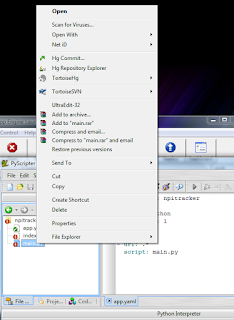
NOTE : I have not yet managed to get debugging working with pyscripter .... stop reading here. For debugging with PyDev check this out :)
If you want to simply debug your application with pyscripter you can add the following folder to your PYTHONPATH environment variable "C:\Program Files\Google\google_appengine". The contents of this folder are shown:
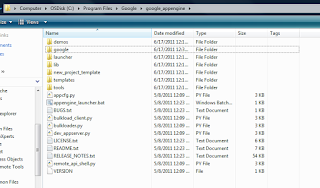
You also need to add a pythonpath entry for select folders in"C:\Program Files\Google\google_appengine\lib"
The contents of this folder in my case are shown:

so the complete PYTHONPATH setting is : "C:\Program Files\Google\google_appengine;C:\Program Files\Google\google_appengine\lib\antlr3;C:\Program Files\Google\google_appengine\lib\django_0_96;C:\Program Files\Google\google_appengine\lib\fancy_urllib;C:\Program Files\Google\google_appengine\lib\graphy;C:\Program Files\Google\google_appengine\lib\ipaddr;C:\Program Files\Google\google_appengine\lib\simplejson;C:\Program Files\Google\google_appengine\lib\webob;C:\Program Files\Google\google_appengine\lib\yaml\lib"
Note my python path settings:
 After you have set the pythonpath you MUST RESTART GAE Launcher. Now click edit and run main.py
You can see a successful break point below:
 But this is just a script running outside a web server. You can launch the Google App Engine web server INSIDE of pyscripter to get the debugging goodness of a running web application as follows.
Notice the commandline for the python started by launcher using process explorer :
 In my case it was : "C:\PYTHON\App\pythonw.exe "C:\Program Files\Google\google_appengine\dev_appserver.py" --admin_console_server= --port=8080 D:\CODETEST\npitracker\npitracker"
Now you are going to configure pyscripter to run the file "C:\Program Files\Google\google_appengine\dev_appserver.py" for us.
Open this file in pyscripter and select run -- Command Line parameters.
Set the command parameters to your project as shown:

In my case I kept the command line parameters as : "--admin_console_server= --port=8080 D:\CODETEST\npitracker\npitracker"
Now setup a breakpoint anywhere cool in the project as shown:

Switch back to "dev_appserver.py" and run. Browse to your website (http://localhost:8080) in my case and enjoy the debugging goodness.
Note: (GAE version 1.5.0)
Enjoy!
Getting the development launcher to work with portable python (for version 2.5.4) was slightly tricky in that you need to point to the python executable rather than the folder in which the executable is found. i.e in my case in "Google App Engine Launcher" go to Edit -- Preferences and notice the "Python Path". I needed to set it to "C:\PYTHON\App\pythonw.exe" OR "C:\PYTHON\App\python.exe"
Also I set the editor to pyscripter "C:\PYTHON\App\Pyscripter.exe" as shown.


Notice that not only can I view all the files in the same directory but also see my commit options since I have tortoise Hg installed:

NOTE : I have not yet managed to get debugging working with pyscripter .... stop reading here. For debugging with PyDev check this out :)
If you want to simply debug your application with pyscripter you can add the following folder to your PYTHONPATH environment variable "C:\Program Files\Google\google_appengine". The contents of this folder are shown:

You also need to add a pythonpath entry for select folders in"C:\Program Files\Google\google_appengine\lib"
The contents of this folder in my case are shown:

so the complete PYTHONPATH setting is : "C:\Program Files\Google\google_appengine;C:\Program Files\Google\google_appengine\lib\antlr3;C:\Program Files\Google\google_appengine\lib\django_0_96;C:\Program Files\Google\google_appengine\lib\fancy_urllib;C:\Program Files\Google\google_appengine\lib\graphy;C:\Program Files\Google\google_appengine\lib\ipaddr;C:\Program Files\Google\google_appengine\lib\simplejson;C:\Program Files\Google\google_appengine\lib\webob;C:\Program Files\Google\google_appengine\lib\yaml\lib"
Note my python path settings:

You can see a successful break point below:

Notice the commandline for the python started by launcher using process explorer :

Now you are going to configure pyscripter to run the file "C:\Program Files\Google\google_appengine\dev_appserver.py" for us.
Open this file in pyscripter and select run -- Command Line parameters.
Set the command parameters to your project as shown:

In my case I kept the command line parameters as : "--admin_console_server= --port=8080 D:\CODETEST\npitracker\npitracker"
Now setup a breakpoint anywhere cool in the project as shown:

Switch back to "dev_appserver.py" and run. Browse to your website (http://localhost:8080) in my case and enjoy the debugging goodness.
Note: (GAE version 1.5.0)
PS: for python path option in launcher "C:\PYTHON\App\" did not work. If I left it at that and run a project the browse button does not become enabled in the launcher and a busy indicator is shown next to the project.
Saturday, March 26, 2011
Swap two numbers without using a temp variable
A friend of mine asked this question while we were in college. I didn't pay much attention to the question, didn't believe it was possible (because we were taught how to swap variables ... and taught to use a temp variable for it). I thought he joking and moved on.
But in my first programming job test this question was there: "How can you swap two numbers without using a temp variable. Hint: think of a mathematical operator"
And the hint gave it away :) I was quite proud of figuring it out myself. You basically just need to store the sum and subtract alternately. Here .. look at the code :
 Some C#ish notes:
Notice that it works even beyond int.MaxValue :) But for it to work you need to make sure that the assembly is not built with checked option and the code is not in a checked scope : http://msdn.microsoft.com/en-us/library/74b4xzyw(v=VS.100).aspx
And Just out of curiosity:
Know that in python being a super cool language you can just do :
[x , y] = [ y , x ]
Now ain't that super cool!

Live and learn....and Enjoy!
But in my first programming job test this question was there: "How can you swap two numbers without using a temp variable. Hint: think of a mathematical operator"
And the hint gave it away :) I was quite proud of figuring it out myself. You basically just need to store the sum and subtract alternately. Here .. look at the code :

Notice that it works even beyond int.MaxValue :) But for it to work you need to make sure that the assembly is not built with checked option and the code is not in a checked scope : http://msdn.microsoft.com/en-us/library/74b4xzyw(v=VS.100).aspx
And Just out of curiosity:
Know that in python being a super cool language you can just do :
[x , y] = [ y , x ]
Now ain't that super cool!

Live and learn....and Enjoy!
Thursday, October 28, 2010
Python Icons
The official Icons used by applications in Python 2.5 are available at the following URL:
http://www.doxdesk.com/software/py/pyicons.html
Awesomeness in a box :)
http://www.doxdesk.com/software/py/pyicons.html
Awesomeness in a box :)
Tuesday, July 21, 2009
Getting row counts in all excel file by sheet names
The scenario:
You have a number of excel files (xls). In each excel file there various sheets. Each sheet has a header and a number of lines following it. You want an output of the format (csv):
filename1, sheet name 1, row count , sheet name 2, row count, sheet name 3, row count
filename2, sheet name 1, row count , sheet name 2, row count, sheet name 3, row count
Well here is a script that does just that!
You will need python and dexutils both downloadable from : google code
make a folder (i will call it SCRIPT) and make a file getsheetrowcounts.py containing the following data :
Next make a folder "input" inside of SCRIPT and place all the excel files in this folder. Finally run getsheetrowcounts.py and you will get the desired output.csv
You have a number of excel files (xls). In each excel file there various sheets. Each sheet has a header and a number of lines following it. You want an output of the format (csv):
filename1, sheet name 1, row count , sheet name 2, row count, sheet name 3, row count
filename2, sheet name 1, row count , sheet name 2, row count, sheet name 3, row count
Well here is a script that does just that!
You will need python and dexutils both downloadable from : google code
make a folder (i will call it SCRIPT) and make a file getsheetrowcounts.py containing the following data :
import dex
from dex import xlrd

decrementoneforheader = True

files = dex.glob('./input/*.xls')

book = {}  # book['filename']=[]

for file in files:
    wb = xlrd.open_workbook(file)
    file = dex.GetFilenameWithoutExt(file)
    sheets = wb.sheet_names()

   for sheetname in sheets:
        sh = wb.sheet_by_name(sheetname)
        rowcount = sh.nrows

       try:
            book[file]
        except:
            book[file]=[]
        book[file].append(sheetname)
        if (decrementoneforheader):
            rowcount = rowcount-1
        book[file].append(str(rowcount))


# now we have the data
outlines = []
for bookname in book.keys():
   line = bookname
   rows = book[bookname]
    for column in rows:
        line = line + "," + column

   outlines.append(line)

dex.writelines('output.csv',outlines)
Next make a folder "input" inside of SCRIPT and place all the excel files in this folder. Finally run getsheetrowcounts.py and you will get the desired output.csv
DEXUTILS: A python utility library I wish I had in EVERY language
I have been working with python for 2 years now. It is by far the most general purpose language and productive programming language I have experienced to date.
The first thing that any professional programmer should get for python is an AWESOME IDE. I HIGHLY recommend wingware's Python IDE. It truly is worth the money and comes for all flavors of operating systems. For those using windows and wanting something free software I recommend using mmm-experts python scripters. Both have an amazing feature of clicking (while holding the ctrl key) to navigate to a function. So I basically have a folder put in the Environment variable PYTHONPATH and in that I place a folder by the name dex. Now in my code I do import dex and I can type function name. If any is not working I can modify it there and then in my script.
I do a lot of general purpose programming and over the time dex (aka dexutils ) has expanded exponentially. So without further ado I present you dexutils.
It comes with a simple distutils installer (for windows users an installer is also always present
For quick programming hacks I dont want to waste time opening / reading and then closing a file. So I made a quick function about it:
import dex
lines = dex.readlines('filename')
For saving a lines to a file you can do :
import dex
lines = ['1','2','3','4','5']
dex.writelines('temp.txt',lines)
This makes using python faster than writing a macro in vba anyday!
There a LOTS of functions in it. Some quite advanced. Almost all of them come with __doc__ strings so if you are using wingware or pyscripter you get cool help information.
Here a a couple more:
Check if a string can be made an integer:
from dex import stringutils
print stringutils.IsInt('123')
Splitting a CSV string: (will print ['1', '2', '3', 'stuff', '5'])
from dex import stringutils
print stringutils.SplitCSV('1,2,3,"stuff",5')
Print the current scripts filename :
from dex import stringutils
print stringutils.GetFilename(__file__)
How about reversing a string : '123' -> '321'
from dex import stringutils
print stringutils.ReverseStr('123')
There are various modules e.g stringutils , fileutils, arrutils. Just read the docs :) I am sure you will find it helpful. Also any cool library I found highly useful I have made a part of the code. e.g. xlrd (more on that later).
The link (again) : dexutils
Enjoy!
The first thing that any professional programmer should get for python is an AWESOME IDE. I HIGHLY recommend wingware's Python IDE. It truly is worth the money and comes for all flavors of operating systems. For those using windows and wanting something free software I recommend using mmm-experts python scripters. Both have an amazing feature of clicking (while holding the ctrl key) to navigate to a function. So I basically have a folder put in the Environment variable PYTHONPATH and in that I place a folder by the name dex. Now in my code I do import dex and I can type function name. If any is not working I can modify it there and then in my script.
I do a lot of general purpose programming and over the time dex (aka dexutils ) has expanded exponentially. So without further ado I present you dexutils.
It comes with a simple distutils installer (for windows users an installer is also always present
For quick programming hacks I dont want to waste time opening / reading and then closing a file. So I made a quick function about it:
import dex
lines = dex.readlines('filename')
For saving a lines to a file you can do :
import dex
lines = ['1','2','3','4','5']
dex.writelines('temp.txt',lines)
This makes using python faster than writing a macro in vba anyday!
There a LOTS of functions in it. Some quite advanced. Almost all of them come with __doc__ strings so if you are using wingware or pyscripter you get cool help information.
Here a a couple more:
Check if a string can be made an integer:
from dex import stringutils
print stringutils.IsInt('123')
Splitting a CSV string: (will print ['1', '2', '3', 'stuff', '5'])
from dex import stringutils
print stringutils.SplitCSV('1,2,3,"stuff",5')
Print the current scripts filename :
from dex import stringutils
print stringutils.GetFilename(__file__)
How about reversing a string : '123' -> '321'
from dex import stringutils
print stringutils.ReverseStr('123')
There are various modules e.g stringutils , fileutils, arrutils. Just read the docs :) I am sure you will find it helpful. Also any cool library I found highly useful I have made a part of the code. e.g. xlrd (more on that later).
The link (again) : dexutils
Enjoy!
Saturday, March 14, 2009
SOAPpy wsdl Security
I was working on SOAPpy to access the web service exposed by JasperServer (REALLY COOL STUFF). SOAPpy can automatically retrieve function definitions from WSDL as so:
If you want SOAPpy to authenticate you should simply put url like :
'http://username:password@computerip_name'
etc. SOAPpy internally uses urllib. It should be able to handle that.
However SOAPpy cannot authenticate method calls. You can make it authentication aware by reading more about it here:
http://www.voidspace.org.uk/python/articles/authentication.shtml
Also, since only manually testing revealed this. SOAPpy (version : 0.12) does not handle soap attachments (you can't use it as it is with Jasper). Had to test it to find out. ZSI does.
from SOAPpy import WSDL
url = 'yoururl'
# just use the path to the wsdl of your choice
wsdlObject = WSDL.Proxy(url + '?wsdl')
print 'Available methods:'
for method in wsdlObject.methods.keys() :
print method
ci = wsdlObject.methods[method]
# you can also use ci.inparams
for param in ci.outparams :
# list of the function and type
# depending of the wsdl...
print param.name.ljust(20) , param.type
If you want SOAPpy to authenticate you should simply put url like :
'http://username:password@computerip_name'
etc. SOAPpy internally uses urllib. It should be able to handle that.
However SOAPpy cannot authenticate method calls. You can make it authentication aware by reading more about it here:
http://www.voidspace.org.uk/python/articles/authentication.shtml
Also, since only manually testing revealed this. SOAPpy (version : 0.12) does not handle soap attachments (you can't use it as it is with Jasper). Had to test it to find out. ZSI does.
Saturday, December 6, 2008
MakeStruct Utility Porgram
Just created a small utility program to speed up python programming (as if it wasn't fast enough!)
Ever wanted to make quick structures in python but didn't cause it took too much time (like 5 seconds more :D). Well this will help you with that.
A picture is worth a thousand words:) :

Goto : http://code.google.com/p/makestruct/downloads/list to download the Exe.
If you use the source version you will also need http://code.google.com/p/dexutils/
Enjoy ! :)
Ever wanted to make quick structures in python but didn't cause it took too much time (like 5 seconds more :D). Well this will help you with that.
A picture is worth a thousand words:) :

Goto : http://code.google.com/p/makestruct/downloads/list to download the Exe.
If you use the source version you will also need http://code.google.com/p/dexutils/
Enjoy ! :)
Subscribe to:
Posts (Atom)